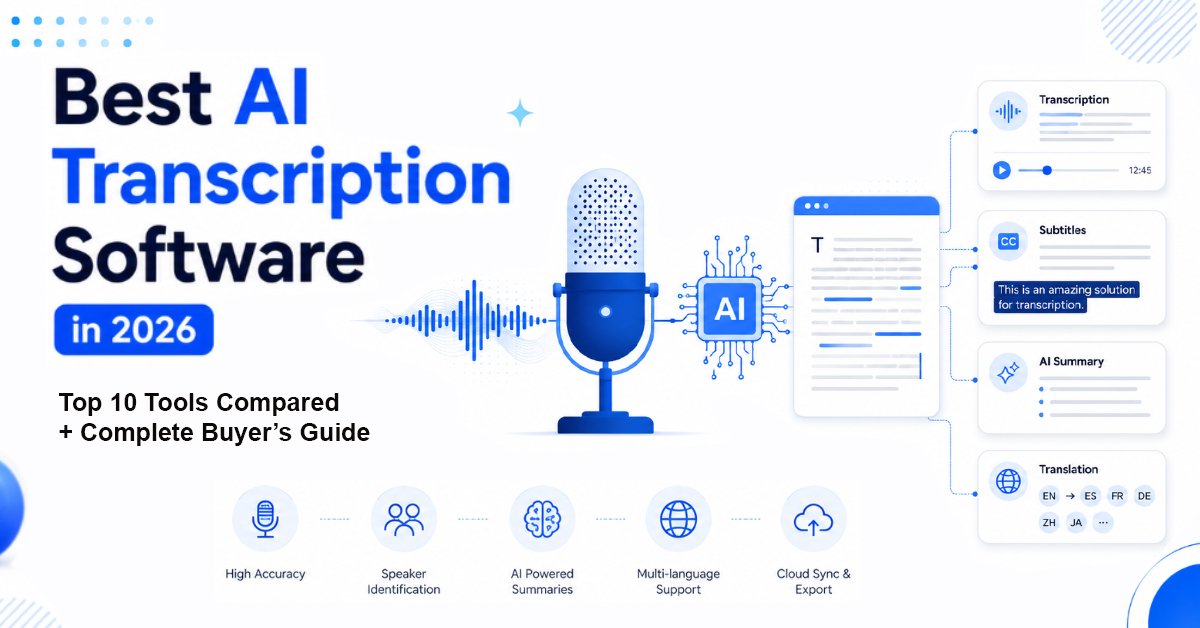
AI Transcription Software: Quick Answer
If you’re short on time, here’s the answer:
Notta is our top overall pick for the best AI transcription software in 2026 because it offers an excellent balance of transcription accuracy, AI meeting summaries, multilingual support, collaboration features, and value for money.
However, the “best” tool depends on your workflow:
| Use Case | Recommended Tool |
| 🏆 Best Overall | Notta |
| 💼 Best for Meetings | Otter.ai |
| 🎥 Best for YouTube & Podcasts | Descript |
| 🎯 Best Accuracy | Rev AI |
| 👥 Best for Teams | Fireflies.ai |
| 🌍 Best Multilingual Support | Sonix |
| 📰 Best for Journalists | Trint |
| 💰 Best Value | TurboScribe |
| 🎬 Best for Video Captions | VEED |
| 🎓 Best Budget Option | Happy Scribe |
If you’re choosing only one tool, start with Notta. It strikes the best balance for most individuals, creators, students, and businesses.
TL;DR
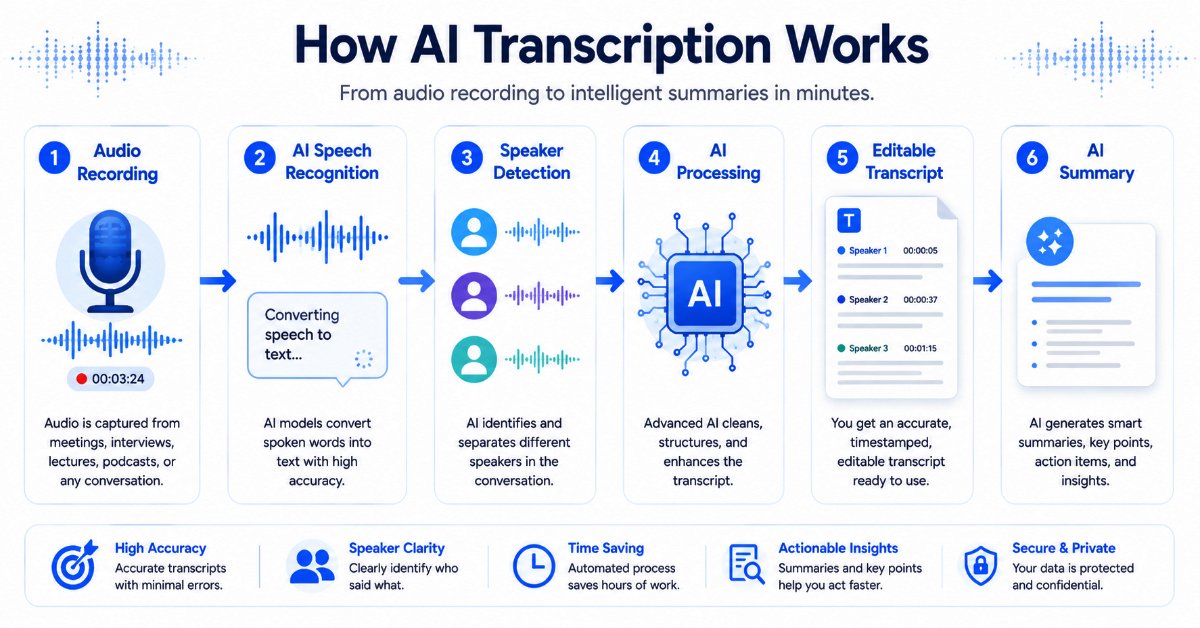
AI transcription software has become far more than a speech-to-text tool. Today’s platforms can automatically transcribe meetings, identify speakers, generate AI-powered summaries, create subtitles, translate conversations, and even extract action items.
After evaluating the leading options available in 2026, our recommendations are:
- Best Overall: Notta
- Best for Business Meetings: Otter.ai
- Best for Content Creators: Descript
- Best Accuracy: Rev AI
- Best Team Collaboration: Fireflies.ai
- Best for Multilingual Work: Sonix
In this guide, we’ll compare each tool based on accuracy, features, pricing, ease of use, integrations, AI capabilities, and overall value—so you can confidently choose the one that fits your needs.
The Best AI Transcription Software at a Glance
Before diving into detailed reviews, here’s a side-by-side comparison of our top recommendations.
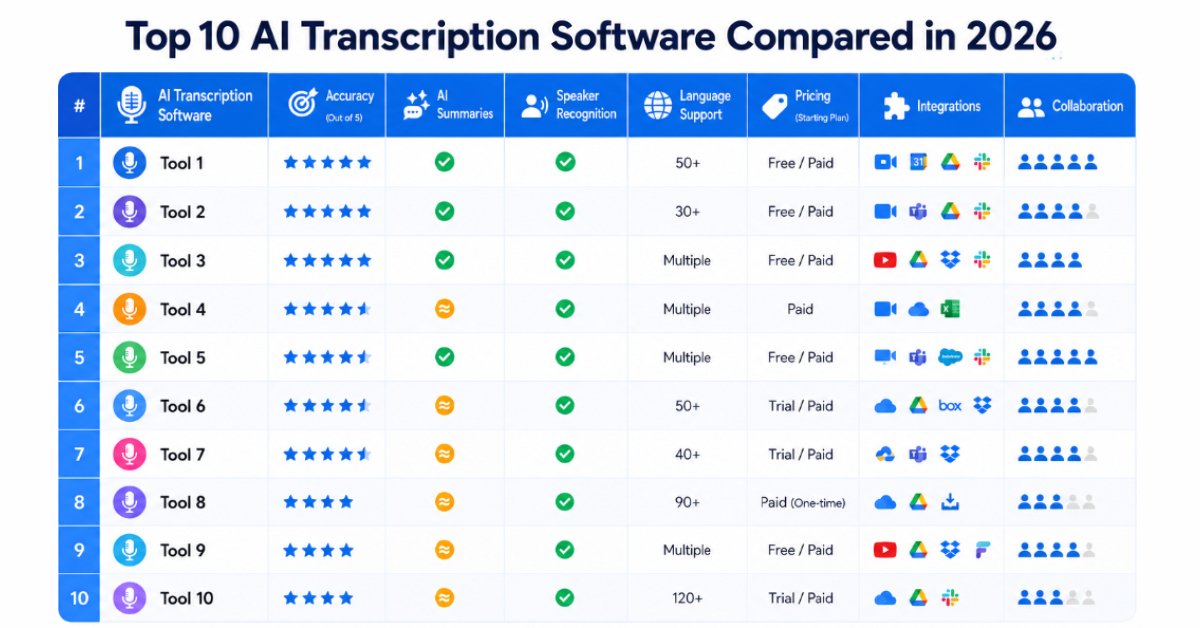
| Tool | Accuracy | AI Summary | Speaker Recognition | Languages | Free Plan | Best For |
| Notta | ⭐⭐⭐⭐⭐ | ✅ | ✅ | 50+ | ✅ | Overall Best |
| Otter.ai | ⭐⭐⭐⭐⭐ | ✅ | ✅ | Limited | ✅ | Meetings |
| Descript | ⭐⭐⭐⭐⭐ | ✅ | ✅ | Multiple | ✅ | Creators |
| Rev AI | ⭐⭐⭐⭐⭐ | Limited | ✅ | Multiple | Limited | Accuracy |
| Fireflies.ai | ⭐⭐⭐⭐☆ | ✅ | ✅ | Multiple | ✅ | Teams |
| Sonix | ⭐⭐⭐⭐☆ | Limited | ✅ | 50+ | Trial | Multilingual |
| Trint | ⭐⭐⭐⭐☆ | Limited | ✅ | 40+ | Trial | Journalism |
| TurboScribe | ⭐⭐⭐⭐☆ | Basic | ✅ | 90+ | Limited | Value |
| VEED | ⭐⭐⭐⭐☆ | Basic | ✅ | Multiple | ✅ | Video Captions |
| Happy Scribe | ⭐⭐⭐⭐☆ | Basic | ✅ | 120+ | Trial | Budget |
Why You Can Trust WebWorldSolution
Hundreds of AI software tools claim to be the “best,” but many comparison articles simply repeat information from official websites without helping readers understand which tool is actually right for them.
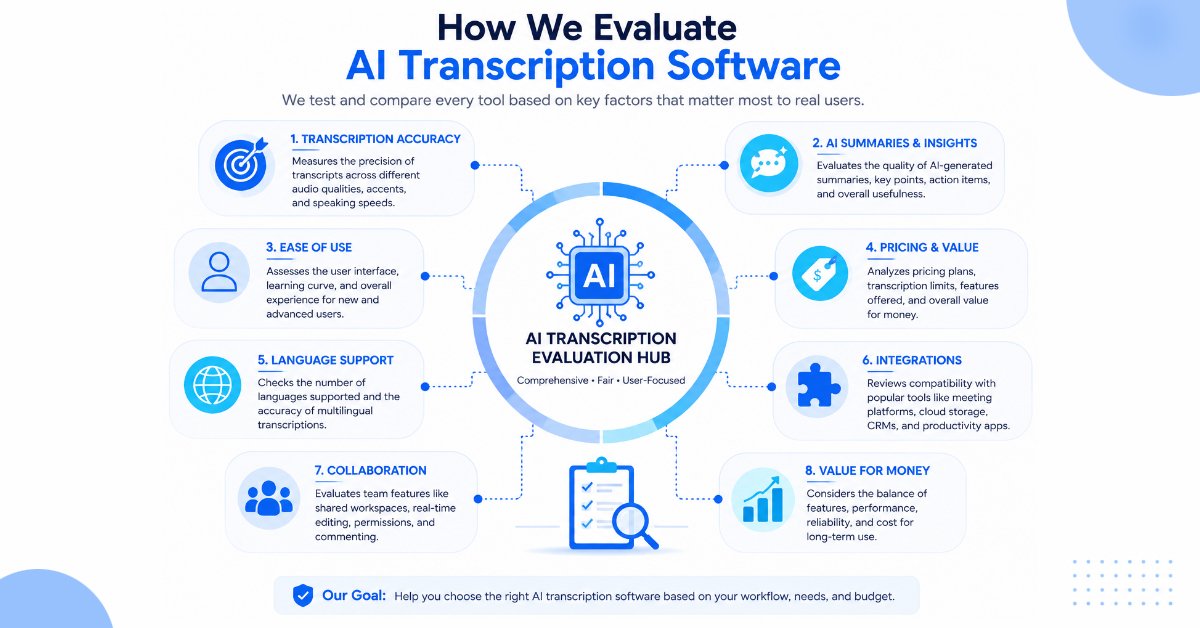
For this guide, we focused on what matters most to real users:
- Overall transcription accuracy
- AI-powered features
- Ease of use
- Collaboration capabilities
- Language support
- Integrations with popular productivity tools
- Pricing and long-term value
- Suitability for different use cases
Rather than recommending one tool for everyone, we highlight where each platform excels and where it falls short. A content creator editing podcasts has different needs than a legal professional documenting interviews or a sales team managing customer calls.
Our goal is simple: help you choose the right AI transcription software based on your workflow—not marketing claims.
Editorial Note: Tool features, pricing, and availability can change over time. We recommend checking each provider’s official website before making a purchase decision.
How We Evaluated the Best AI Transcription Software
Not all AI transcription tools are created equal. Some prioritize meeting automation, while others focus on video editing, multilingual transcription, or enterprise collaboration.
hoosing the right AI Transcription Software requires looking beyond marketing claims and focusing on real-world performance, usability, and long-term value.
To ensure a fair comparison, we evaluated each platform using the same set of criteria.
Many modern transcription engines are built on advanced speech-recognition models such as OpenAI Whisper, which has helped improve multilingual transcription accuracy and language recognition.
| Evaluation Factor | Weight | Why It Matters |
| Transcription Accuracy | 30% | Incorrect transcripts require time-consuming manual edits. |
| Features & AI Capabilities | 20% | Summaries, speaker detection, action items, and AI insights improve productivity. |
| Ease of Use | 15% | A clean interface reduces the learning curve. |
| Pricing & Value | 10% | Good software should justify its cost. |
| Integrations | 10% | Compatibility with Zoom, Google Meet, Microsoft Teams, Google Drive, Slack, CRMs, and more. |
| Language Support | 10% | Essential for global teams and multilingual workflows. |
| Customer Support & Reliability | 5% | Responsive support and dependable performance are important for professional users. |
Important: No single tool is perfect for every situation. That’s why you’ll see different recommendations throughout this guide depending on your profession, workflow, and budget.
If you’re new to artificial intelligence and want to understand the technology behind modern transcription platforms, our guide on Artificial Intelligence vs Machine Learning explains the core concepts in a simple, beginner-friendly way.
How to Choose the Right AI Transcription Software
If you’re comparing transcription tools for the first time, it’s easy to become overwhelmed. Nearly every platform promises “industry-leading accuracy” and “AI-powered productivity.”
The best AI Transcription Software should match your workflow instead of simply offering the longest list of features.
Instead of focusing on marketing claims, ask yourself these five questions:
1. What type of content do you transcribe most often?
- Business meetings
- Interviews
- Podcasts
- YouTube videos
- Lectures
- Customer calls
- Research recordings
The answer immediately narrows your options.
2. Do you need more than transcription?
Many modern transcription platforms rely on advanced AI capabilities. If you’re curious about how these technologies differ, read our detailed guide on AI vs Machine Learning vs Deep Learning to understand how they power today’s intelligent software.
Many modern tools now include:
- AI meeting summaries
- Automatic action items
- Speaker identification
- Subtitle generation
- Translation
- Searchable transcripts
- Team collaboration
If you only need a transcript, paying for advanced collaboration features may not be worthwhile.
3. How important is accuracy?
For legal, medical, or research work, accuracy is often more important than editing convenience. In contrast, content creators may prioritize speed and subtitle generation.
4. Will you work alone or with a team?
Solo users often need simplicity and affordability, while businesses benefit from shared workspaces, comments, permissions, and integrations.
5. What’s your budget?
Many platforms offer generous free plans, but professionals handling frequent recordings may save time and money with a paid subscription.
Who Should Use AI Transcription Software?
AI transcription tools are no longer limited to journalists and researchers. Today, they’re used across a wide range of industries to improve productivity and reduce manual work.
Today’s AI Transcription Software is designed for everyone from students and creators to enterprise teams and researchers.
Some of the professionals who benefit the most include:
- Students recording lectures
- Journalists conducting interviews
- Podcasters and YouTubers
- Marketing teams repurposing content
- Sales teams documenting customer calls
- HR professionals recording interviews
- Lawyers organizing case discussions
- Researchers analyzing qualitative interviews
- Healthcare professionals creating consultation notes
- Businesses documenting meetings and decisions
The best software for each of these users isn’t always the same—which is why we’ll highlight the ideal choice for every use case later in this guide.
Businesses looking to automate repetitive tasks beyond transcription can also explore our list of the best AI tools for small businesses, which covers productivity, marketing, customer support, and workflow automation solutions.
Top 10 Best AI Transcription Software in 2026 (Detailed Reviews)
1. Notta — Best Overall AI Transcription Software
Overall Rating: ⭐⭐⭐⭐⭐ 9.8/10
Best For
- Business professionals
- Students
- Journalists
- Freelancers
- Consultants
- Small and medium-sized businesses
If you want one transcription tool that performs well in almost every scenario, Notta is our top recommendation for 2026.
Unlike many competitors that specialize in just one area, Notta combines fast AI transcription, meeting recording, multilingual support, AI summaries, speaker recognition, and cloud collaboration into a single, easy-to-use platform.
Whether you need to capture a client meeting, transcribe an interview, or turn a lecture into searchable notes, Notta makes the entire transcription process straightforward while still providing the essential features most users need.
One of its biggest strengths is that beginners can start using it within minutes, while advanced users still have access to productivity features like automatic meeting notes, action items, and integrations with popular conferencing platforms.
Why We Picked It
Many transcription tools are excellent at one task but require additional software for everything else.
Notta offers one of the most balanced experiences available today.
Instead of forcing users to switch between multiple applications, it brings recording, transcription, AI summaries, editing, and collaboration together in one platform.
For most users, that’s exactly what makes it the best overall choice.
What Makes It Different?
Many AI transcription tools are excellent at one specific task—such as recording meetings, editing podcasts, or generating subtitles—but require additional software for everything else.
Notta takes a more balanced approach by combining transcription, AI-generated summaries, multilingual support, speaker recognition, cloud synchronization, and collaboration features in a single platform.
That versatility makes it suitable for a wide range of users, from students and freelancers to business professionals and growing teams, without forcing them to manage multiple applications.
Key Features
- AI-powered speech-to-text transcription
- Live meeting transcription
- Upload audio and video files
- AI-generated meeting summaries
- Automatic speaker recognition
- Searchable transcripts
- Timestamp support
- Multi-language transcription
- Cloud synchronization
- Team collaboration
- Mobile and desktop apps
Pros
- Excellent transcription accuracy for clear recordings.
- AI-generated summaries save time by highlighting the key points from long meetings.
- Beginner-friendly interface that’s easy to navigate.
- Supports multiple languages for international users.
- Competitive pricing with a useful free plan.
- Strong value for money
Cons
- Free plan has monthly limits
- Some advanced collaboration tools require premium plans
Pricing
Notta includes a free plan that’s suitable for occasional use, while its premium plans provide higher transcription allowances, support for longer recordings, advanced AI capabilities, and collaboration tools for teams.
Value for Money
⭐⭐⭐⭐⭐
Considering its feature set and ease of use, Notta delivers excellent value for individuals and growing teams.
Who Should Skip It?
If your primary goal is advanced podcast or video editing, you’ll likely get more value from Descript.
Best Alternative
If Notta doesn’t fully match your needs, Otter.ai is an excellent alternative for users who spend most of their day in online meetings and want deeper collaboration features.
Final Verdict
If you only plan to subscribe to one AI transcription platform this year, Notta is the safest recommendation for most people because it balances usability, accuracy, AI features, and affordability better than almost any competitor.
2. Otter.ai — Best AI Transcription Software for Meetings
Overall Rating: ⭐⭐⭐⭐⭐ 9.7/10
Best For
- Remote teams
- Corporate meetings
- Project managers
- Sales teams
- HR professionals
- Consultants
Otter.ai has become one of the most recognizable names in AI meeting transcription, and for good reason.
Instead of functioning as a simple transcription tool, it acts like an AI meeting assistant.
It can automatically join Zoom, Google Meet, and Microsoft Teams meetings, record conversations, generate searchable transcripts, identify speakers, create summaries, and highlight action items.
For organizations that spend hours every week in online meetings, this automation can save significant time while improving documentation.
Why We Picked It
Meeting notes often consume valuable time and attention.
Otter.ai reduces that burden by capturing conversations automatically, allowing participants to focus on the discussion instead of taking notes.
Its meeting-first approach makes it one of the strongest productivity tools for modern workplaces.
What Makes It Different?
Unlike traditional transcription software, Otter.ai focuses on making meetings more productive rather than simply converting speech into text. Its AI meeting assistant automatically joins supported meetings, creates summaries, identifies action items, and keeps conversations searchable, making it especially valuable for remote teams and organizations.
Key Features
- Live meeting transcription
- Automatic AI meeting assistant
- AI summaries
- Speaker identification
- Shared workspaces
- Searchable transcripts
- Calendar integration
- Team collaboration
- Meeting highlights
- Mobile support
Pros
- Outstanding meeting workflow
- Excellent collaboration tools
- Fast transcript generation
- Automatic summaries
- Easy sharing across teams
Cons
- Less suitable for editing podcasts or videos
- Offline transcription options are limited
Pricing
Otter.ai provides a free tier with usage limits, while premium plans increase transcription allowances and unlock additional collaboration features.
Value for Money
⭐⭐⭐⭐⭐
Businesses that rely heavily on meetings can recover many hours each month through Otter.ai’s automation.
Who Should Skip It?
If you mainly transcribe prerecorded interviews or edit podcast episodes, Descript or Rev AI may be a better fit.
Final Verdict
Otter.ai remains one of the best AI meeting assistants available today and is an excellent choice for businesses that want accurate transcripts, AI summaries, and collaborative meeting notes.
3. Descript — Best for Content Creators and Podcasters
Overall Rating: ⭐⭐⭐⭐⭐ 9.6/10
Best For
- YouTubers
- Podcasters
- Video editors
- Online educators
- Marketing agencies
- Social media creators
Descript is much more than transcription software.
It’s a complete content creation platform that combines transcription, audio editing, video editing, subtitle generation, screen recording, and AI-powered enhancements.
Its biggest innovation is text-based editing.
Instead of trimming video clips manually on a timeline, you simply edit the transcript. Delete a sentence from the transcript, and that section disappears from the video or audio automatically.
For creators producing content every week, this workflow can save hours of editing.
Why We Picked It
Most transcription tools stop after creating a transcript.
Descript continues the workflow by helping creators edit, polish, and publish content without switching between multiple applications.
What Makes It Different?
Descript combines transcription with powerful audio and video editing tools, allowing users to edit media simply by editing text. This streamlined workflow helps content creators save significant editing time when producing podcasts, YouTube videos, online courses, and other types of multimedia content.
Key Features
- AI transcription
- Text-based editing
- Automatic subtitles
- Podcast editing
- Screen recording
- AI voice enhancement
- Filler word removal
- Multi-track editing
- AI summaries
- Collaboration tools
Pros
- Excellent creator workflow
- Easy subtitle generation
- Beginner-friendly interface
- Saves editing time
- Strong podcast features
Cons
- Advanced editing tools require premium plans
- Large projects perform best on modern hardware
Pricing
Descript includes a free plan, with paid subscriptions offering longer transcription limits and advanced AI editing capabilities.
Value for Money
⭐⭐⭐⭐⭐
For creators who regularly produce audio or video content, Descript can replace several standalone tools.
Who Should Skip It?
If you only need simple meeting transcripts and don’t edit media, Notta or Otter.ai may offer better value.
Final Verdict
Descript is easily the best AI transcription software for creators who want to record, edit, subtitle, and publish content from one platform.
If your primary goal is creating blogs, scripts, or marketing content alongside transcription, don’t miss our guide to the best AI writing tools for students and content creators, where we compare the top AI writing assistants available today.
4. Rev AI — Best for Accuracy
Overall Rating: ⭐⭐⭐⭐⭐ 9.5/10
Best For
- Journalists
- Researchers
- Legal professionals
- Healthcare documentation
- Professional interviews
When accuracy matters more than anything else, Rev AI is one of the strongest choices available.
Rev built its reputation through professional human transcription services before expanding into AI-powered transcription.
This strong foundation is reflected in the platform’s emphasis on accuracy, consistency, and dependable performance.
For users who require even greater confidence, Rev also allows AI-generated transcripts to be upgraded to human-reviewed versions.
This flexibility makes it especially attractive for industries where mistakes can have serious consequences.
Why We Picked It
Not every transcript needs to be perfect.
However, for legal interviews, research projects, published articles, and professional documentation, accuracy often matters more than editing speed.
Rev addresses that need exceptionally well.
What Makes It Different?
Rev AI prioritizes transcription accuracy and reliability. Rather than prioritizing team collaboration or content production features, Rev is built for professionals who require consistently accurate transcripts, with the added option of human transcription when the highest level of precision is essential.
Key Features
- High-accuracy AI transcription
- Human transcription option
- Speaker recognition
- Timestamp support
- Caption generation
- API access
- Secure file handling
- Multiple export formats
Pros
- Excellent accuracy
- Human review available
- Trusted professional reputation
- Fast turnaround
- Reliable exports
Cons
- Human transcription costs more
- Fewer AI productivity features than some competitors
Pricing
Rev offers AI transcription alongside optional human transcription services priced separately.
Value for Money
⭐⭐⭐⭐☆
Professionals who value accuracy above all else will likely find the additional cost worthwhile.
Who Should Skip It?
If your priority is AI meeting summaries or collaborative team workspaces, Otter.ai or Fireflies.ai are stronger choices.
Final Verdict
Rev AI is the benchmark for users who prioritize precision and reliability over advanced workflow automation.
Editor’s Recommendations
If you’re still undecided after reading the first four reviews, here’s a quick shortcut:
| If you are… | Choose… | Why |
| Student | Notta | Easy to use, affordable, great for lectures |
| Business Professional | Otter.ai | Excellent meeting transcription and summaries |
| YouTuber | Descript | Built-in editing and subtitle tools |
| Journalist | Rev AI | High transcription accuracy and human review option |
| Freelancer | Notta | Best overall balance of features and pricing |
5. Fireflies.ai — Best AI Transcription Software for Teams & Sales
Overall Rating: ⭐⭐⭐⭐⭐ 9.5/10
Best For
- Sales teams
- Customer success teams
- HR departments
- Remote organizations
- Enterprise businesses
If your work revolves around meetings, customer calls, and team collaboration, Fireflies.ai is one of the smartest investments you can make.
Unlike traditional transcription software, Fireflies.ai is built around conversation intelligence. It doesn’t just create transcripts—it captures key moments, generates AI-powered meeting summaries, extracts action items, and integrates with CRMs and workplace tools.
For sales managers, this means every customer conversation becomes searchable. For HR teams, interviews can be documented automatically. For managers, follow-up tasks are no longer buried inside hour-long recordings.
Why We Picked It
Fireflies.ai transforms conversations into actionable business insights rather than simple transcripts. That makes it particularly valuable for organizations that rely on meetings to drive decisions.
What Makes It Different?
Fireflies.ai goes beyond transcription by turning conversations into searchable business knowledge. Its integrations with CRM systems, meeting platforms, and collaboration tools make it particularly useful for sales, customer success, and operations teams that rely on accurate meeting documentation.
Key Features
- Automatic meeting recording
- AI-generated meeting summaries
- Action item detection
- Speaker recognition
- Searchable transcripts
- CRM integrations
- Slack integration
- Google Meet, Zoom & Microsoft Teams support
- Team collaboration
- Analytics dashboard
Pros
- Excellent meeting automation
- Powerful AI summaries
- Great collaboration tools
- Strong CRM integrations
- Easy meeting search
Cons
- Less suitable for podcast editing
- Advanced features require premium plans
Pricing
Offers a free plan with paid tiers for advanced collaboration, analytics, and higher transcription limits.
Value for Money
⭐⭐⭐⭐⭐
Teams that spend hours each week in meetings will likely recover far more value than the subscription cost.
Who Should Skip It?
If you only need occasional audio transcription, Notta or Happy Scribe may be more affordable.
Final Verdict
Fireflies.ai is one of the best AI meeting assistants available and an excellent choice for organizations focused on collaboration and productivity.
6. Sonix — Best AI Transcription Software for Multilingual Projects
Overall Rating: ⭐⭐⭐⭐☆ 9.3/10
Best For
- Global businesses
- Translation agencies
- Researchers
- International marketing teams
- Educational institutions
Working across multiple languages introduces challenges that many transcription tools struggle to handle.
That’s where Sonix stands out.
It supports transcription in dozens of languages while also offering translation, subtitle generation, and collaborative editing. This makes it particularly valuable for companies serving international audiences.
Its browser-based editor allows users to review transcripts while listening to synchronized audio, simplifying corrections and improving workflow efficiency.
Why We Picked It
Sonix is one of the strongest options for organizations that regularly work with multilingual audio or international teams.
What Makes It Different?
Sonix stands out because it combines AI transcription with strong multilingual capabilities and translation features. It’s an excellent choice for businesses, researchers, and content creators who regularly work with recordings in different languages and need a streamlined workflow for international audiences.
Key Features
- Multilingual transcription
- AI translation
- Subtitle generation
- Speaker identification
- Browser-based editor
- Searchable transcripts
- Team collaboration
- Timestamp editing
- API support
Pros
- Excellent language support
- Fast processing
- Clean editing interface
- Good subtitle workflow
- Reliable collaboration tools
Cons
- Usage-based pricing may become expensive
- AI summaries are less advanced than some competitors
Pricing
Flexible pricing with pay-as-you-go and subscription options depending on usage.
Value for Money
⭐⭐⭐⭐☆
Ideal for multilingual workflows, though heavy users should compare pricing carefully.
Who Should Skip It?
If you only work in English and don’t require translation features, Notta or Otter.ai may offer better overall value.
Best Alternative
If you mainly work in English and don’t need multilingual transcription, Notta offers a more balanced feature set with AI summaries and collaboration tools.
Final Verdict
Sonix is an excellent choice for businesses and professionals working across multiple languages.
7. Trint — Best AI Transcription Software for Journalists & Researchers
Overall Rating: ⭐⭐⭐⭐☆ 9.2/10
Best For
- Journalists
- Researchers
- Documentary filmmakers
- Universities
- Editorial teams
Journalists and researchers don’t simply need transcripts—they need transcripts they can verify, organize, annotate, and search quickly.
That’s exactly where Trint excels.
Its synchronized transcript editor allows users to review recordings while editing text, making fact-checking significantly faster than traditional workflows.
Collaborative editing, highlights, comments, and project organization make it especially attractive for editorial teams working together.
Why We Picked It
Trint was designed around professional research and editorial workflows rather than general productivity.
What Makes It Different?
Trint is designed for professionals who need to review, verify, and organize large amounts of spoken content. Its editing workspace and collaboration features make it particularly valuable for journalists, researchers, and documentary teams handling lengthy interviews.
Key Features
- AI transcription
- Audio synchronization
- Collaborative editing
- Speaker recognition
- Keyword search
- Highlights & comments
- Story-building workspace
- Translation support
Pros
- Excellent editing interface
- Reliable organization tools
- Strong collaboration features
- Ideal for long interviews
- Professional workflow
Cons
- Premium pricing
- Learning curve for new users
Pricing
Subscription-based with plans designed for professionals and organizations.
Value for Money
⭐⭐⭐⭐☆
Excellent investment for researchers and media professionals.
Who Should Skip It?
Students and casual users may find Happy Scribe or Notta more affordable and easier to learn.
Best Alternative
If affordability is your main priority, Happy Scribe offers a simpler transcription experience at a lower cost while still supporting subtitles and multiple export formats.
Final Verdict
Trint remains one of the best AI transcription platforms for professional journalism and research projects.
8. TurboScribe — Best Value for High-Volume Transcription
Overall Rating: ⭐⭐⭐⭐☆ 9.2/10
Best For
- Freelancers
- Agencies
- Researchers
- Students
- Heavy transcription users
If you regularly process dozens of recordings every month, transcription costs can quickly become expensive.
TurboScribe addresses this by offering generous transcription limits at competitive pricing.
Its interface is intentionally simple, focusing on speed rather than unnecessary complexity.
For freelancers handling interviews or agencies managing client recordings, this straightforward approach is refreshing.
Why We Picked It
TurboScribe offers one of the strongest price-to-performance ratios among AI transcription platforms.
What Makes It Different?
TurboScribe focuses on delivering fast, affordable transcription without unnecessary complexity. It’s especially attractive for freelancers, agencies, and heavy users who process large volumes of audio and want dependable results at a competitive price.
Key Features
- Fast AI transcription
- Speaker recognition
- Timestamp support
- Multiple export formats
- Translation
- Large file uploads
- Simple cloud interface
Pros
- Excellent value
- Fast processing
- Easy to use
- Good language support
- Large transcription capacity
Cons
- Limited collaboration features
- Few advanced AI productivity tools
Pricing
Competitive subscription plans aimed at frequent users.
Value for Money
⭐⭐⭐⭐⭐
One of the best options for anyone transcribing large volumes of content.
Who Should Skip It?
Businesses needing meeting summaries or CRM integrations should consider Fireflies.ai or Otter.ai.
Best Alternative
If you also need AI meeting summaries and collaboration tools, Fireflies.ai provides a more feature-rich experience for business users.
Final Verdict
TurboScribe proves that affordable software doesn’t have to sacrifice speed or reliability.
9. VEED — Best AI Transcription Software for Video Captions
Overall Rating: ⭐⭐⭐⭐☆ 9.0/10
Best For
- YouTubers
- Instagram creators
- TikTok creators
- Marketing teams
- Online educators
Video creators often need more than transcripts—they need captions that are accurate, attractive, and easy to edit.
VEED combines AI transcription with browser-based video editing, allowing users to generate subtitles and publish videos without switching between multiple applications.
This streamlined workflow is especially valuable for social media creators producing frequent short-form content.
Why We Picked It
VEED focuses on helping creators move quickly from recorded video to publish-ready content.
What Makes It Different?
VEED combines AI transcription with an online video editor, allowing creators to generate captions, edit videos, and publish content from a single platform. This integrated workflow makes it especially useful for YouTubers, marketers, and social media creators.
Key Features
- AI transcription
- Automatic subtitles
- Online video editor
- Subtitle translation
- Social media exports
- Brand customization
- Team collaboration
Pros
- Very beginner-friendly
- Fast subtitle generation
- Cloud-based workflow
- Great for short-form videos
- Easy exports
Cons
- Limited enterprise features
- Not intended for large-scale meeting transcription
Pricing
Free version available with premium plans unlocking advanced editing and export capabilities.
Value for Money
⭐⭐⭐⭐☆
Excellent for creators publishing video content regularly.
Who Should Skip It?
If your primary need is business meeting documentation, Otter.ai or Fireflies.ai are much stronger options.
Best Alternative
If your focus is podcast production or advanced media editing, Descript offers more powerful editing capabilities while maintaining excellent transcription quality.
Final Verdict
VEED is one of the easiest ways to generate captions and subtitles for modern video content.
10. Happy Scribe — Best Budget-Friendly AI Transcription Software
Overall Rating: ⭐⭐⭐⭐☆ 8.9/10
Best For
- Students
- Freelancers
- Bloggers
- Educators
- Small businesses
Not everyone needs enterprise collaboration or AI-powered meeting assistants.
Sometimes you simply want affordable transcription that works.
Happy Scribe delivers exactly that.
It combines AI transcription, subtitle generation, translation, and optional human transcription services in a clean, beginner-friendly interface.
Why We Picked It
Happy Scribe offers one of the best balances between affordability and usability for everyday users.
What Makes It Different?
Happy Scribe offers an excellent balance between affordability and simplicity. In addition to AI transcription, it provides optional human transcription services, making it a flexible choice for users who occasionally need an extra level of accuracy.
Key Features
- AI transcription
- Human transcription option
- Subtitle generation
- Translation
- Speaker recognition
- Multiple export formats
- Team collaboration
Pros
- Affordable pricing
- Easy to learn
- Human review available
- Good subtitle support
- Reliable exports
Cons
- AI accuracy depends on recording quality
- Fewer advanced AI workflow features
Pricing
Flexible plans suitable for occasional and regular users.
Value for Money
⭐⭐⭐⭐⭐
Excellent value for students and freelancers.
Who Should Skip It?
Large organizations requiring advanced automation should look at Fireflies.ai or Notta instead.
Best Alternative
If you want more advanced AI features such as meeting summaries and collaboration tools, Notta is a stronger all-around option for everyday productivity.
Final Verdict
Happy Scribe is an excellent entry point into AI transcription without requiring a large investment.
Comparison Table: Best AI Transcription Software in 2026
| Tool | Accuracy | AI Summaries | Speaker Recognition | Free Plan | Best For | Overall Rating |
| Notta | ⭐⭐⭐⭐⭐ | ✅ | ✅ | ✅ | Best Overall | 9.8/10 |
| Otter.ai | ⭐⭐⭐⭐⭐ | ✅ | ✅ | ✅ | Meetings | 9.7/10 |
| Descript | ⭐⭐⭐⭐⭐ | ✅ | ✅ | ✅ | Content Creators | 9.6/10 |
| Rev AI | ⭐⭐⭐⭐⭐ | Limited | ✅ | Limited | Accuracy | 9.5/10 |
| Fireflies.ai | ⭐⭐⭐⭐☆ | ✅ | ✅ | ✅ | Teams | 9.5/10 |
| Sonix | ⭐⭐⭐⭐☆ | Limited | ✅ | Trial | Multilingual | 9.3/10 |
| Trint | ⭐⭐⭐⭐☆ | Limited | ✅ | Trial | Journalists | 9.2/10 |
| TurboScribe | ⭐⭐⭐⭐☆ | Basic | ✅ | Limited | High-Volume Users | 9.2/10 |
| VEED | ⭐⭐⭐⭐☆ | Basic | ✅ | ✅ | Video Captions | 9.0/10 |
| Happy Scribe | ⭐⭐⭐⭐☆ | Basic | ✅ | Trial | Budget Users | 8.9/10 |
Quick Recommendations by User Type
Sometimes, you don’t need to compare every feature—you just want to know which tool fits your workflow.
| If You Are… | Recommended Tool | Why We Recommend It |
| Student | Notta | Easy to use, affordable, great for lectures and study notes |
| Journalist | Trint | Powerful editing, searchable transcripts, collaboration tools |
| Researcher | Rev AI | Excellent transcription accuracy and reliable exports |
| YouTuber | Descript | Transcript-based editing, subtitles, and AI enhancements |
| Podcaster | Descript | Edit audio by editing text and remove filler words quickly |
| Sales Professional | Fireflies.ai | Meeting intelligence, CRM integrations, and AI summaries |
| Remote Team | Otter.ai | Automatic meeting notes and collaboration features |
| Small Business | Notta | Balanced features with excellent value |
| Enterprise | Fireflies.ai | Team collaboration, automation, and analytics |
| Budget-Conscious User | Happy Scribe | Affordable, reliable, and beginner-friendly |
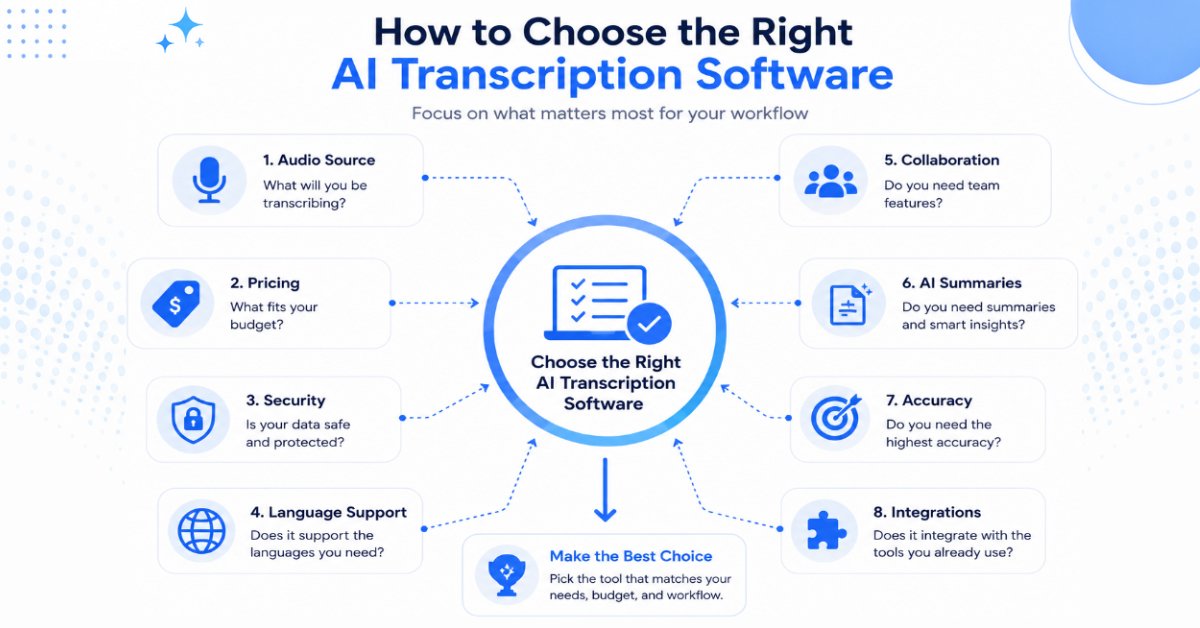
Complete Buyer’s Guide: How to Choose the Best AI Transcription Software
Finding the best AI transcription software isn’t about choosing the platform with the most features—it’s about selecting the one that fits your workflow, budget, and long-term needs.
Investing in the right AI Transcription Software can save countless hours by automating transcription, note-taking, and content organization.
For example, a journalist interviewing multiple sources has very different requirements than a YouTuber creating subtitles or a sales team documenting client meetings. Choosing the wrong tool can lead to unnecessary costs, lower productivity, and hours spent correcting transcripts.
Before subscribing to any platform, consider the following factors.
Quick Checklist Before You Buy
Before choosing an AI transcription tool, ask yourself these five questions:
- Do I need transcription for meetings, interviews, videos, or lectures?
- How important is transcription accuracy for my work?
- Will I benefit from AI summaries and speaker recognition?
- Do I need support for multiple languages?
- Does the software fit my budget and workflow?
If you can answer these questions first, you’ll find it much easier to choose the right tool.
1. Transcription Accuracy Should Be Your Top Priority
Accuracy is the foundation of every transcription tool.
A common way to measure transcription quality is Word Error Rate (WER), an industry-standard metric used to evaluate speech-recognition accuracy.
Even software packed with AI features becomes frustrating if you spend more time correcting mistakes than the tool saves.
Most leading AI transcription platforms perform exceptionally well with:
- Clear recordings
- Modern microphones
- One speaker at a time
- Minimal background noise
However, accuracy may decrease when recordings include:
- Heavy accents
- Multiple people talking simultaneously
- Poor internet calls
- Loud background environments
- Technical or industry-specific terminology
Pro Tip: If you’re producing legal documents, medical records, research interviews, or publication-ready content, always review the transcript before sharing or publishing it.
Accuracy Isn’t Everything
High transcription accuracy is important, but it shouldn’t be the only factor when comparing software.
A tool that is slightly less accurate but saves hours with AI summaries, searchable transcripts, and seamless integrations may provide greater overall value than one that focuses only on transcription quality.
2. Consider Your Primary Workflow
Many people purchase software based on feature lists instead of daily needs.
Ask yourself:
Do you mostly attend online meetings?
Choose tools like:
- Otter.ai
- Fireflies.ai
- Notta
These platforms automatically record meetings, identify speakers, and generate AI summaries.
Do you create YouTube videos or podcasts?
Look for:
- Descript
- VEED
These tools combine transcription with video editing, subtitles, and content publishing.
Do you conduct interviews or research?
Prioritize:
- Rev AI
- Trint
They emphasize transcript quality, editing, timestamps, and professional workflows.
Do you need multilingual transcription?
Consider:
- Sonix
- Happy Scribe
Both support multiple languages and translation features that are useful for international teams.
3. AI Features Can Save More Time Than Transcription Alone
Modern transcription platforms have evolved far beyond converting speech into text.
Modern AI Transcription Software continues to evolve by combining speech recognition with advanced AI productivity features.
Some now include:
- AI-generated summaries
- Action items
- Meeting highlights
- Speaker recognition
- Automatic chapter creation
- Keyword extraction
- Searchable transcripts
- AI-powered note organization
Many of these advanced capabilities are powered by modern large language models (LLMs) that can understand context and generate useful summaries.
These features can dramatically reduce the time spent reviewing long recordings.
4. Ease of Use Matters More Than You Think
A feature-rich platform isn’t always the best choice if it’s difficult to learn.
When evaluating software, ask:
- Is the interface intuitive?
- Can you upload files quickly?
- Is editing straightforward?
- Are transcripts easy to export?
- Can new team members learn it without extensive training?
Simple workflows often lead to higher long-term productivity.
5. Integration With Your Existing Tools
The best transcription software should fit naturally into your existing workflow.
Popular integrations include:
- Zoom
- Google Meet
- Microsoft Teams
- Google Drive
- Dropbox
- Slack
- Notion
- Salesforce
- HubSpot
If your organization already depends on these tools, choosing compatible software can eliminate unnecessary manual work.
Think About Your Daily Workflow
The best transcription software is the one that fits naturally into the tools you already use.
For example, if your team relies on Zoom, Google Meet, Slack, or a CRM platform, choosing software with native integrations can eliminate repetitive manual work and improve productivity.
6. Security and Privacy Are Essential
If your recordings contain confidential information, privacy should be a deciding factor—not an afterthought.
If you work with sensitive client or business information, it’s also worth checking whether a provider follows recognized standards such as SOC 2 compliance.
Look for platforms that offer:
- Encrypted file transfers
- Secure cloud storage
- User permission controls
- Compliance with relevant privacy standards
- Transparent data retention policies
Organizations in healthcare, legal services, education, and finance should pay particular attention to these areas.
7. Pricing Should Match Your Usage
One of the biggest mistakes buyers make is paying for features they’ll never use.
Instead of asking, “Which tool is cheapest?”, ask:
“Which tool provides the best value for the way I actually work?”
If you only transcribe a few recordings each month, a free plan or pay-as-you-go model may be sufficient.
If your business processes dozens of meetings every week, investing in a premium subscription can quickly pay for itself through time savings.
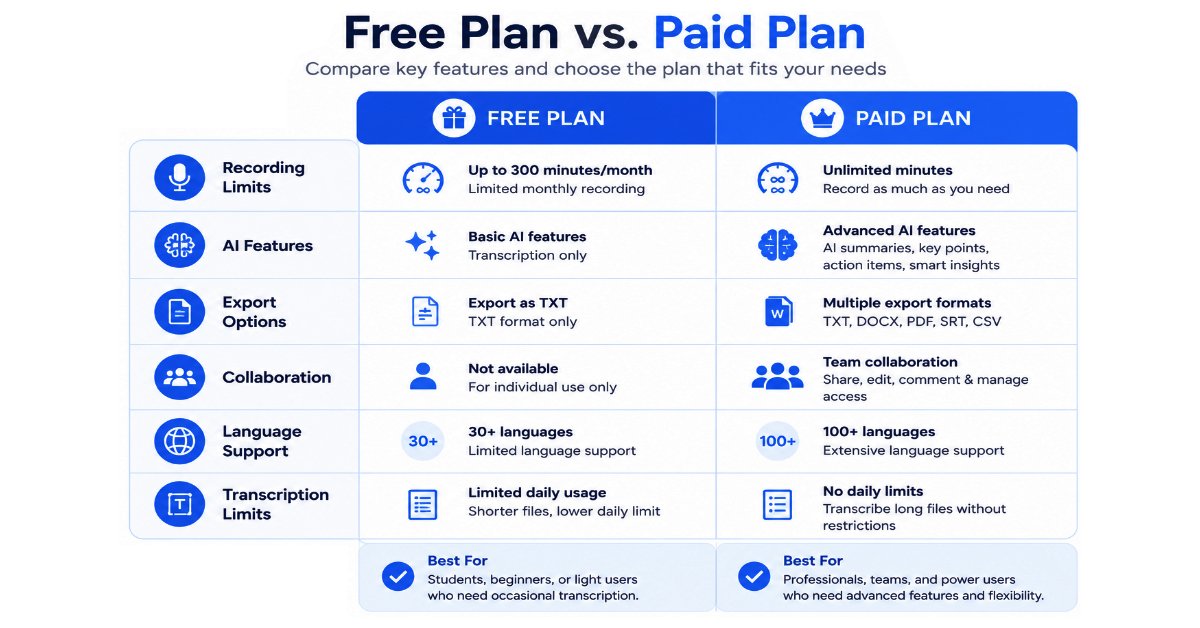
Free vs. Paid AI Transcription Software
Many excellent transcription platforms offer free plans, making it easy to test their capabilities before purchasing.
Comparing free and premium AI Transcription Software plans helps you understand which features are essential for your workflow.
However, free plans usually come with limitations.
| Feature | Free Plans | Paid Plans |
| Monthly transcription limit | Limited | Higher or Unlimited |
| Recording length | Restricted | Longer recordings |
| AI summaries | Limited | Included |
| Speaker recognition | Basic | Advanced |
| Export options | Limited | Full access |
| Team collaboration | Minimal | Complete |
| Priority processing | No | Yes |
| Customer support | Standard | Priority |
Start Small and Upgrade Only When Needed
Many users assume they need a premium subscription from day one.
In reality, starting with a free plan allows you to evaluate transcription accuracy, ease of use, and workflow compatibility before committing to a paid subscription.
Once you understand your requirements, upgrading becomes a much more informed decision.
When a Free Plan Is Enough
A free plan is often sufficient if you:
- Record occasional lectures
- Transcribe short interviews
- Create subtitles for personal videos
- Want to test different platforms before subscribing
When a Paid Plan Makes Sense
A premium subscription is worthwhile if you:
- Attend meetings every day
- Produce podcasts or YouTube videos regularly
- Work with clients
- Manage a remote team
- Need AI summaries and action items
- Require advanced integrations
Common Mistakes People Make When Choosing AI Transcription Software
Many buyers focus on the wrong criteria and end up switching platforms later.
Avoid these common mistakes.
Choosing Based Only on Price
The cheapest software isn’t always the best value.
If a platform saves several hours every week, paying a monthly subscription may be more cost-effective than spending time editing poor transcripts.
Ignoring Audio Quality
Even the most advanced AI model cannot produce perfect transcripts from poor recordings.
Good microphones often improve transcription accuracy more than switching software.
Paying for Features You’ll Never Use
Enterprise collaboration tools are unnecessary if you’re a solo creator.
Similarly, a business relying on CRM integrations may quickly outgrow a basic transcription platform.
Choose software based on your actual workflow—not the longest feature list.
Overlooking Language Support
If your recordings involve multiple languages, verify that the platform supports them before subscribing.
Not all tools perform equally well across different languages and accents.
Forgetting About Export Options
Always confirm that transcripts can be exported in the formats you need, especially if you’re using subtitles, research software, or documentation systems.
Tips to Get More Accurate AI Transcriptions
Even the best AI transcription software performs better when you provide high-quality recordings.
Here are some practical ways to improve accuracy.
Even the most advanced AI Transcription Software performs better when recordings are clear and free from background noise.
Use a Dedicated Microphone
External USB microphones typically capture cleaner audio than built-in laptop microphones.
Reduce Background Noise
Choose a quiet environment whenever possible.
Turn off fans, televisions, and other constant noise sources before recording.
Speak Clearly
Natural speech works best, but avoiding excessive interruptions and speaking over others improves transcript quality.
Separate Speakers
When multiple participants avoid talking simultaneously, AI can identify speakers much more accurately.
Upload the Original Recording
Whenever possible, upload the original audio or video file instead of compressed versions received through messaging apps.
Review Important Transcripts
If the transcript will be published, submitted, or used professionally, spend a few minutes reviewing it for names, numbers, and technical terminology.
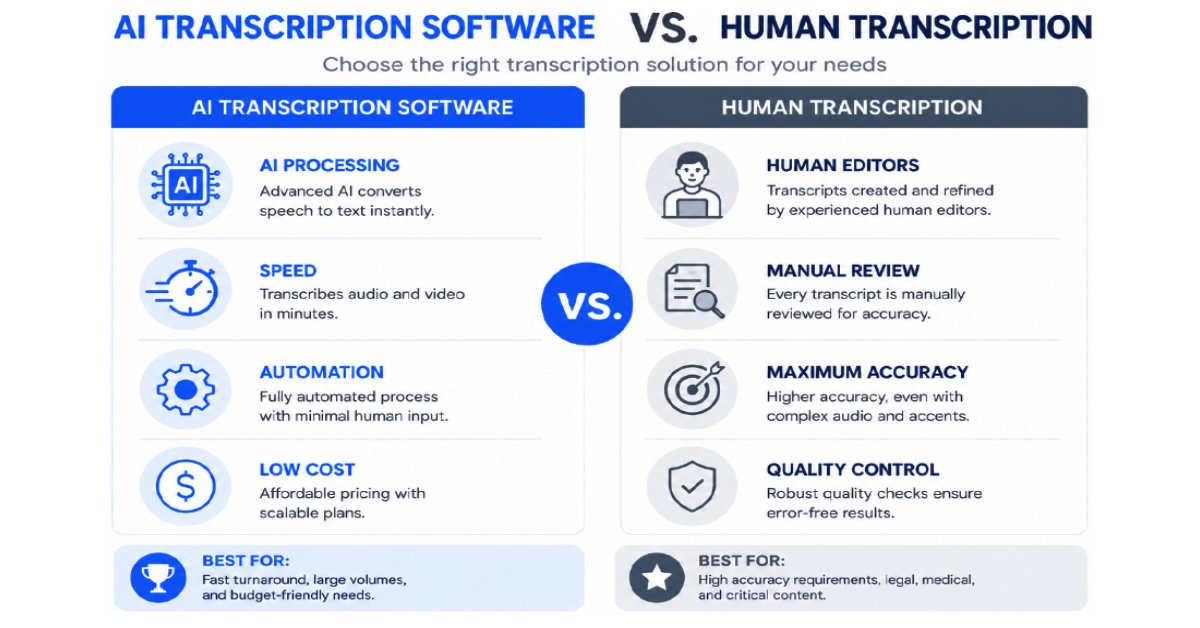
AI Transcription Software vs Human Transcription
Many users wonder whether AI has completely replaced human transcription.
Although AI Transcription Software has improved dramatically, human review remains valuable for highly sensitive or regulated industries.
While AI continues to improve rapidly, advances in speech recognition technology have been a major reason why automated transcription is now practical for many everyday workflows.
The answer depends on the purpose of the transcript.
| AI Transcription | Human Transcription |
| Fast turnaround | Slower turnaround |
| Lower cost | Higher cost |
| Excellent for everyday workflows | Best for highly sensitive documents |
| Scales easily | Limited by human capacity |
| May require editing | Generally more polished |
For meetings, lectures, podcasts, and internal documentation, AI transcription is often more than sufficient.
For legal proceedings, medical documentation, or published research where every word matters, human review can still provide additional confidence.
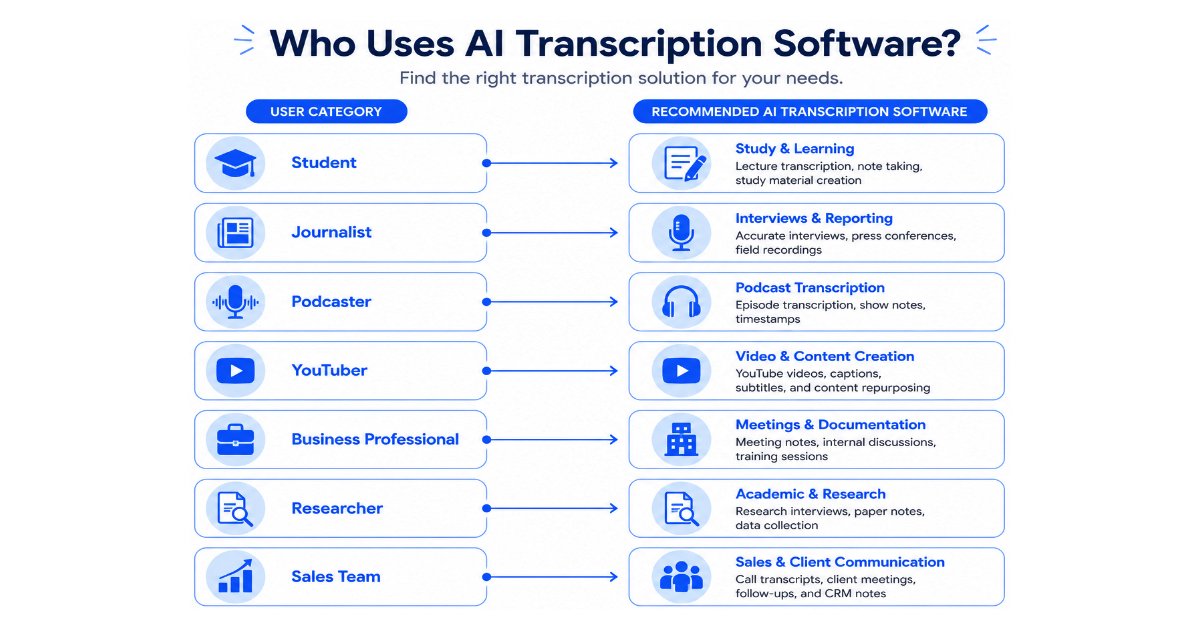
Which AI Transcription Software Is Right for You?
If you’re still unsure, use this quick decision guide.
Selecting the right AI Transcription Software depends on your profession, recording volume, and collaboration needs.
| Your Situation | Recommended Tool |
| I attend Zoom meetings every day | Otter.ai |
| I create YouTube videos | Descript |
| I need the best all-around option | Notta |
| I work with international clients | Sonix |
| I conduct interviews | Rev AI |
| I manage a sales team | Fireflies.ai |
| I’m on a tight budget | Happy Scribe |
| I transcribe hours of audio every week | TurboScribe |
Still Can’t Decide?
If you’re comparing several tools and they all seem similar, don’t worry.
Most leading AI transcription platforms offer free plans or trial versions. Testing two or three tools using the same recording is often the fastest way to discover which interface, editing workflow, and AI features best match your needs.
The “best” software isn’t necessarily the one with the most features—it’s the one that helps you complete your work more efficiently.
Expert Recommendation
If this is your first AI transcription tool, start with Notta.
It offers one of the best balances of accuracy, usability, AI-powered features, collaboration, and pricing.
As your needs evolve, you can always move to a more specialized platform like Descript for media editing or Fireflies.ai for enterprise meeting intelligence.
How We Evaluated These AI Transcription Tools
Choosing the best AI transcription software isn’t simply about comparing feature lists or marketing claims.
For this guide, we evaluated each tool using the criteria that matter most to everyday users and professionals, including:
- Transcription accuracy
- Ease of use
- AI-powered features
- Speaker recognition
- Language support
- Pricing and overall value
- Collaboration capabilities
- Integrations with popular productivity tools
Our recommendations are designed to help different types of users—from students and content creators to business teams and researchers—find the tool that best fits their workflow.
Because AI transcription software evolves rapidly, we’ll continue reviewing and updating this guide to reflect significant feature improvements, pricing changes, and major product updates.
Quick Answers
If you’re short on time, here are our top recommendations:
- Best Overall: Notta
- Best for Meetings: Otter.ai
- Best for Teams: Fireflies.ai
- Best for Content Creators: Descript
- Best for Accuracy: Rev AI
- Best Budget Choice: Happy Scribe
Frequently Asked Questions (FAQs)
1. What is AI transcription software?
AI transcription software uses artificial intelligence and speech recognition technology to automatically convert spoken language into written text. Modern tools can also identify speakers, generate meeting summaries, create subtitles, translate conversations, and extract action items, making them far more powerful than traditional speech-to-text applications.
2. Which AI transcription software is the most accurate?
For clear, high-quality recordings, Rev AI, Notta, Otter.ai, and Descript consistently deliver excellent results. However, no AI transcription tool is 100% accurate. Factors such as background noise, overlapping conversations, strong accents, and poor microphone quality can affect transcription quality.
Remember: Even the best AI transcription software performs better with clear audio, minimal background noise, and good microphone quality.
3. Is AI transcription software free?
Many AI transcription platforms offer free plans or free trials, including Notta, Otter.ai, Fireflies.ai, Descript, and VEED.
Free plans are ideal for occasional users, but they usually include limitations such as:
● Monthly transcription limits
● Shorter recording durations
● Limited AI features
● Restricted export options
Professionals who transcribe recordings regularly often benefit from upgrading to a paid plan.
4. Can AI transcription software recognize different speakers?
Yes. Most modern AI transcription platforms support speaker diarization, which automatically distinguishes between different speakers in a conversation.
The accuracy of speaker recognition generally improves when participants avoid speaking over each other and the recording quality is high.
5. Which AI transcription software is best for Zoom meetings?
If your work involves frequent Zoom meetings, we recommend:
1. Otter.ai
2. Fireflies.ai
3. Notta
These platforms can automatically join meetings, create transcripts, generate AI summaries, and identify action items.
6. Which AI transcription software is best for students?
Students typically benefit most from:
● Notta
● Happy Scribe
These tools are easy to use, affordable, and well suited for recording lectures, organizing study notes, and searching through transcripts.
7. Which AI transcription software is best for YouTubers?
For YouTube creators, Descript is our top recommendation.
It combines transcription, subtitle generation, audio editing, and video editing into a single workflow, helping creators produce content faster.
8. Can AI transcription software translate languages?
Yes.
Several platforms, including Sonix and Happy Scribe, support multilingual transcription and translation, making them useful for international teams, researchers, and businesses working with global audiences.
9. Is AI transcription software safe to use?
Most reputable providers use encryption, secure cloud storage, and privacy controls to protect user data.
However, if you’re handling confidential legal, medical, financial, or business information, review the provider’s security policies and compliance documentation before uploading sensitive recordings.
10. Does AI transcription work offline?
Most modern transcription services operate in the cloud, using advanced AI models hosted on remote servers to process audio quickly and accurately.
Some desktop applications offer limited offline capabilities, but cloud processing generally provides better accuracy and faster updates.
11. Can AI transcription replace human transcription?
For everyday tasks such as meetings, lectures, interviews, podcasts, and content creation, AI transcription is usually more than sufficient.
However, for legal proceedings, medical documentation, academic research, or published material where precision is critical, human review remains valuable.
12. How much does AI transcription software cost?
Pricing varies significantly depending on the platform and feature set.
Many tools offer free plans, while paid subscriptions typically range from budget-friendly individual plans to enterprise solutions with advanced collaboration and analytics.
The best value comes from choosing software that matches your actual workflow rather than simply selecting the lowest price.
Final Verdict
After comparing the leading AI transcription software available in 2026, one thing is clear:
There is no single “perfect” tool for everyone.
Instead, the best AI Transcription Software is the one that aligns with your daily workflow, budget, and productivity goals.
The best choice depends on how you work, the type of content you transcribe, and the features you value most.
That said, several platforms consistently stand out.
Our Top Recommendations
| Category | Winner | Why We Chose It |
| Best Overall | Notta | Outstanding balance of accuracy, AI features, collaboration, and value |
| Best for Meetings | Otter.ai | Excellent AI meeting assistant with automatic summaries |
| Best for Teams | Fireflies.ai | Strong collaboration, CRM integrations, and conversation intelligence |
| Best for Content Creators | Descript | Powerful transcript-based audio and video editing |
| Best Accuracy | Rev AI | Reliable transcripts with optional human review |
| Best Multilingual Support | Sonix | Strong language coverage and translation capabilities |
| Best for Journalists | Trint | Professional editing workflow and collaboration |
| Best Value | TurboScribe | Excellent choice for high-volume transcription at a competitive price |
| Best Budget Option | Happy Scribe | Affordable and beginner-friendly |
| Best for Video Captions | VEED | Fast subtitle generation and browser-based editing |
If We Had to Recommend Just One Tool
For most readers, Notta is the strongest all-around recommendation.
It offers an excellent combination of:
- High transcription accuracy
- AI-powered meeting summaries
- Speaker recognition
- Multilingual support
- Cross-platform availability
- Easy-to-use interface
- Competitive pricing
Whether you’re a student, freelancer, content creator, or business professional, Notta provides a well-rounded solution that meets the needs of most users without an overwhelming learning curve.
Who Should Choose Which Tool?
If you’re still unsure, here’s our simple recommendation:
- Choose Notta if you want the best all-around solution.
- Choose Otter.ai for meetings and collaboration.
- Choose Descript if you create podcasts or YouTube videos.
- Choose Fireflies.ai for sales teams and business meetings.
- Choose Rev AI if transcription accuracy is your highest priority.
- Choose Sonix if you regularly work in multiple languages.
- Choose Happy Scribe if you’re looking for an affordable option.
Conclusion
AI transcription software has evolved far beyond simple speech-to-text conversion.
Today’s platforms can summarize meetings, identify speakers, translate conversations, generate subtitles, organize searchable notes, and help teams collaborate more efficiently.
As artificial intelligence continues to improve, transcription software will become even more accurate, faster, and more deeply integrated into everyday workflows.
The key isn’t choosing the platform with the longest feature list—it’s selecting the one that aligns with how you actually work.
Whether you’re documenting client meetings, producing YouTube videos, conducting interviews, recording lectures, or managing research projects, the right AI transcription software can save countless hours while improving productivity and accessibility.
If you’re just getting started, begin with a free plan whenever possible, test the software using your own recordings, and upgrade only when you need additional features.
A small investment in the right tool can pay for itself many times over through better organization, faster content creation, and reduced manual work.
Final Thoughts
AI transcription software is improving rapidly, and new features are being introduced every year.
Providing accurate transcripts and captions also improves accessibility by following recommendations from the W3C Web Accessibility Initiative (WAI), making content easier for a wider audience to consume.
Instead of searching for the “perfect” tool, focus on choosing software that fits your workflow today while offering the flexibility to grow with your future needs.
We’ll continue updating this guide as leading AI transcription platforms evolve, ensuring our recommendations remain accurate and useful.
Key Takeaways
- AI transcription software converts speech into searchable text using artificial intelligence.
- Notta is our top overall recommendation for most users in 2026.
- Otter.ai and Fireflies.ai are excellent for meetings and team collaboration.
- Descript is ideal for YouTubers, podcasters, and content creators.
- Rev AI offers exceptional accuracy for professional use.
- Sonix is a strong choice for multilingual transcription.
- Free plans are suitable for light use, while paid plans unlock advanced AI features and higher transcription limits.
- Always choose software based on your workflow rather than marketing claims or feature count.
Last Updated: July 2026
This guide is reviewed periodically to reflect significant changes in AI transcription software, including new features, pricing updates, and major product releases.