Technology is part of almost every moment of our daily lives. From sending messages on our phones to watching videos online or working on a laptop, digital tools make these activities possible.
But behind all these devices and applications lies something that quietly powers everything: software.
Without software, computers and smartphones would simply be pieces of hardware with no ability to perform tasks. Software provides the instructions that tell machines what to do, how to process information, and how to interact with users.
In this guide, you’ll learn what software is, how it works, the different types of software, and why it plays such an important role in modern technology.
- 1 Quick Answer — What Is Software?
- 2 Understanding Software in Simple Terms
- 3 A Brief History of Software
- 4 Types of Software
- 5 Software vs Hardware
- 6 How Software Works
- 7 The Software Development Lifecycle (SDLC)
- 8 Advantages of Software
- 9 Disadvantages of Software
- 10 The Future of Software
- 11 Frequently Asked Questions
- 12 Conclusion
Quick Answer — What Is Software?
A collection of programs, data, and instructions that instruct a computer on how to carry out particular activities is referred to as software.
Unlike hardware—which includes physical components like processors, memory, and keyboards—software exists digitally and cannot be touched. Instead, it runs on hardware devices and controls how they operate.
For example, when you browse the internet using Google Chrome or write a document in Microsoft Word, you are interacting with software that communicates with your computer’s hardware to complete those tasks.
In simple terms, hardware is the body of a computer, while software acts as its brain.
Understanding Software in Simple Terms
Imagine buying a brand-new computer.
It includes components like a processor, memory, storage, and a screen. However, without software installed, the computer cannot perform any useful tasks.
Software acts as a set of instructions that tells the hardware how to operate.
For example, when you open a web browser and visit a website, software handles:
- communication with the internet
- loading and displaying web pages
- processing user inputs
- managing system resources
This interaction between hardware and software is what makes modern computing possible.
A Brief History of Software
The concept of software dates back to the earliest days of computing in the mid-20th century.
One of the first stored-program computers was the Manchester Baby, developed in 1948.
Early programmers wrote instructions directly in machine code, which consisted of binary numbers.
Over time, higher-level programming languages were developed, making it easier to create complex applications.
Examples include:
- FORTRAN
- C programming language
- Python
Today, software powers everything from smartphones and websites to artificial intelligence systems.
Modern innovations such as Artificial Intelligence (AI) rely heavily on advanced software systems. If you want to explore this technology in depth, read our detailed guide on 10 Mind-Blowing Facts About AI.
Types of Software
Not all software performs the same function. Some programs control the basic operations of a computer, while others help users complete specific tasks such as editing documents, browsing the internet, or creating applications.
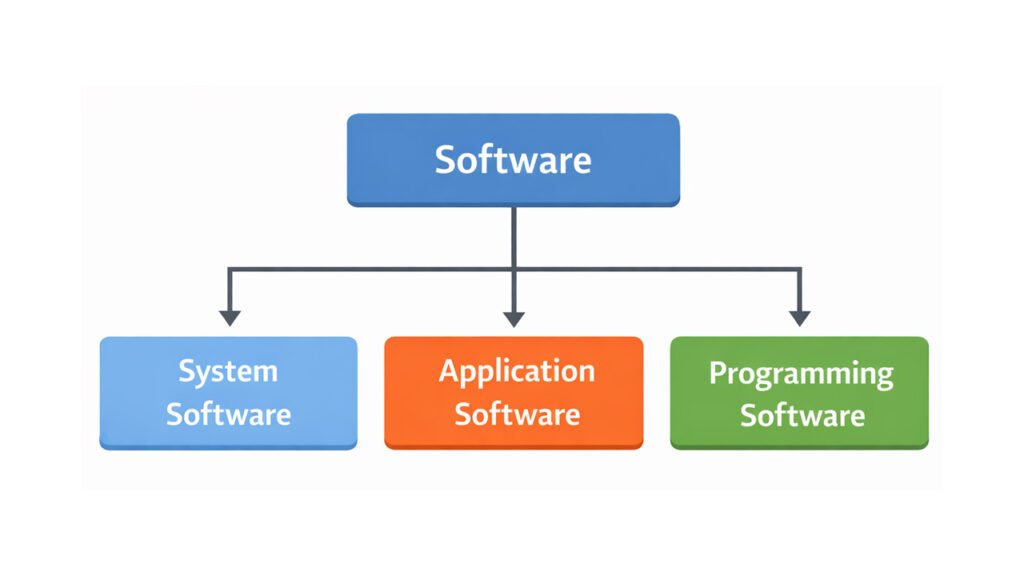
To make things easier to understand, software is generally divided into three main categories
Many modern businesses now rely on cloud-based software platforms known as Software as a Service (SaaS), where applications run online instead of being installed locally. Learn more in our complete guide to SaaS Application Development.
Major technology companies like Microsoft classify software into different categories, including system software, application software, and programming software.
System Software
System software manages and controls computer hardware while providing a platform for other software to run.
An operating system is the most typical example.
Popular operating systems include:
- Microsoft Windows
- macOS
- Linux
Key responsibilities include:
- managing memory
- controlling hardware devices
- managing files
- running applications
Without system software, a computer cannot function properly.
According to IBM, software refers to a set of instructions, data, or programs used to operate computers and execute specific tasks.
System software acts as the foundation of a computer system, managing hardware resources and enabling applications to run efficiently.
Application Software
Application software is made to assist users in carrying out particular tasks.
Common tasks include:
- writing documents
- browsing the internet
- editing photos
- communicating online
Examples include:
- Microsoft Excel
- Adobe Photoshop
- Zoom
Application software is what most users interact with every day.
For example, modern application software now includes AI-powered tools that help students write essays, generate ideas, and improve productivity. You can explore some of the best options in our guide to AI Writing Tools for Students.
Programming Software
Programming software provides tools developers use to create other software.
Programmers can write, test, and debug code with the aid of these tools.
Examples include:
- Visual Studio Code
- Eclipse IDE
- IntelliJ IDEA
Without programming software, building modern applications would be extremely difficult.
Software vs Hardware
Many beginners confuse these two concepts.
Here is the difference:
| Hardware | Software |
| Physical components | Digital instructions |
| Can be touched | Cannot be touched |
| Examples: CPU, keyboard | Examples: operating systems, apps |
Both must work together for a computer to function.
How Software Works
To understand how software works, it helps to imagine a simple interaction between a user and a computer.
When you open an application—such as a browser or a messaging app—you give instructions to the computer through your keyboard, mouse, or touchscreen.
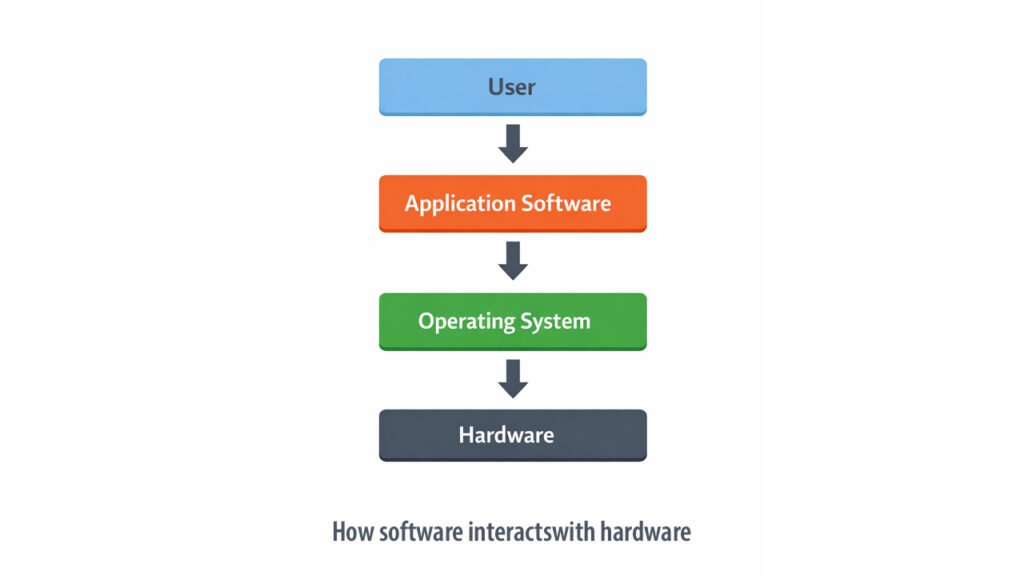
The process usually works like this:
- The user performs an action, such as clicking a button or opening a program.
- The application software processes the request.
- The operating system manages communication between the application and the computer’s hardware.
- The hardware performs the required task and returns the result to the user.
This layered system allows computers to handle complex operations while keeping the user experience simple and intuitive.
The Software Development Lifecycle (SDLC)
Creating reliable software requires a structured process known as the Software Development Lifecycle.
Typical stages include:
- Planning
- Requirements analysis
- Design
- Development
- Testing
- Deployment
- Maintenance
Companies such as Microsoft and Google follow advanced development processes to build software used by billions of people worldwide.
Developers often use modern frameworks to build applications efficiently. For example, popular frameworks like Flutter and React Native allow developers to create mobile apps for multiple platforms from a single codebase. You can learn more in our comparison of Flutter vs React Native.
Advantages of Software
Software provides many benefits that make modern technology possible.
Some key advantages include:
- increased productivity
- automation of repetitive tasks
- improved accuracy in data processing
- easier communication and collaboration
- scalability for businesses and organizations
Disadvantages of Software
Despite its benefits, software also has some limitations.
Common challenges include:
- security vulnerabilities
- software bugs and errors
- compatibility issues between systems
- maintenance and update costs
Understanding these challenges helps developers build more reliable applications.
The Future of Software
Software continues to evolve as technology advances.
Important trends shaping the future include:
- artificial intelligence
- cloud computing
- automation
- low-code development platforms
Organizations like OpenAI and Amazon Web Services are driving innovation in modern software development.
Frequently Asked Questions
What is software in simple words?
Software is a set of instructions and programs that tell a computer how to perform tasks.
What is software in simple words?
The three main types are system software, application software, and programming software.
Why is software important?
Software enables computers and digital devices to perform useful tasks and interact with users.
Conclusion
Software is the invisible force that powers modern computing. It transforms hardware from a simple electronic device into a powerful tool capable of performing millions of tasks.
From operating systems and mobile apps to artificial intelligence platforms, software shapes how we work, communicate, learn, and entertain ourselves in the digital age.
As technology continues to evolve, software will remain at the center of innovation and digital transformation.
Understanding what software is and how it works provides a strong foundation for anyone interested in technology.